


Become the Top 1% ChatGPT User
Updated: Sep 16, 2025
Anyone else feeling a little uneasy about AI? You’re not alone. For those of us who don’t live in the tech trenches all day, it can feel overwhelming—like stepping into a foreign country where everyone else already speaks the language. But here’s the truth: AI is not some passing trend. It’s the next internet.
Think back to the late 90s and early 2000s. The people who came out ahead weren’t the ones who could explain how the internet worked in granular detail. They were the ones who figured out how to leverage it—to save time, to make money, to create opportunity. That’s the same with AI today. You don’t need to know the mechanics. You just need to know how to use it to get more time back for the things you actually want to be doing.
So let’s ditch the fear and step into the fun. Here are 6 ways to become the top 1% of ChatGPT users—practical, powerful, and totally doable.

1. Name Your Chat
Why it’s helpful:
Yes, it sounds silly. But naming your chat keeps things organized and builds familiarity—like texting a friend who always has the right answer.
How to try it:
Start by asking ChatGPT if you can give it a name by saying “Hey, can I give you a name?” It will then say something like “Sure! What would you like to call me?” This is when you can call it something like Brad, Chet, or Sally—pick a name you’d actually enjoy chatting with every day. Every time you open that chat, it knows the history and context and you can start your prompts by saying “Hey Brad…. Write me an email (or whatever your prompt may be)”. Small step, big difference.
2. Create a Master Prompt
Why it’s helpful:
This is your “AI resume.” A Master Prompt tells ChatGPT everything about you—your work, your stage of life, your preferences. That way, its answers come back personalized instead of generic.
How to try it:
Ask ChatGPT:
“Help me create a Master Prompt. Ask me any questions you need about my life, goals, and preferences so we can save it for future use.”
Save the final version as a PDF. Upload it whenever you start fresh or open a new project. And if you’d like a ready-made template to jumpstart your own, just email me and I’ll share my Master Prompt template with you.
3. Unlock System Prompts
Why it’s helpful:
System Prompts... yikes, sounds technical, right? I promise it’s not scary. In fact, this is one of the coolest ways to get the most out of ChatGPT. Most people tell me their output is bland or mediocre. That’s when I turn around and say: then your prompts suck. Harsh? Maybe. True? Absolutely. AI needs specific instructions and context—without it, it’s like asking your GPS to take you somewhere without typing in an address.
How to try it:
Here’s my challenge for you: the next time you go through several iterations and finally land on the response you love, ask ChatGPT:
“What system prompt would have generated this outcome on the first try?”
It will hand you the magic recipe. Copy, paste, and save it into a doc so you can use it again later as a fill‑in‑the‑blank prompt. This is how we stop winging it and actually learn from the AI—so every interaction gets sharper and smarter.
4. Organize with Projects (for Plus and Pro users)
Why it’s helpful:
This is one of the most underutilized features of ChatGPT. Most people just hop in and start creating chats haphazardly—like throwing random socks into the junk drawer and hoping for the best. Projects, on the other hand, create structure and sanity. They help you compartmentalize your different ideas, tasks, and conversations into neat little folders.
How to try it:
Create a Project for each area of your life: Work Proposals, Family Meal Planning, Personal Growth. Suddenly, everything has a home and ChatGPT can reference all your past prompts in that project. It’s like moving from sticky notes all over the fridge to a perfectly organized planner. And trust me—the next feature after this one is really going to blow your mind.
5. Save Outputs as Canvases
Why it’s helpful:
Canvases? Never heard of them? Don’t worry—you’re in good company. I’m convinced 99% of people don’t use this feature (or even know it exists). And honestly? If you aren’t using Canvases, then in my opinion, you don’t really know AI yet. This feature separates the dabblers from the pros.
How to try it:
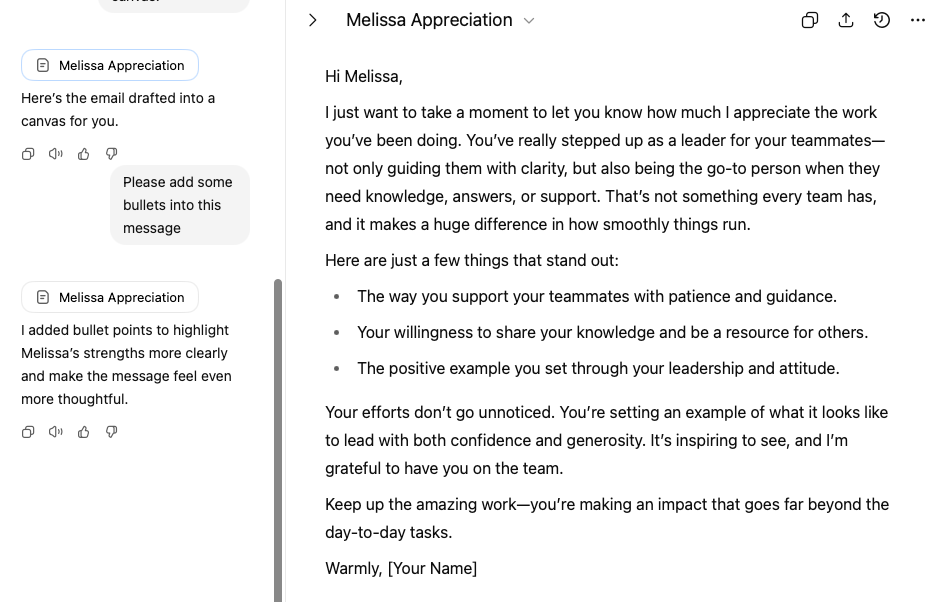
Picture this: you type, “Help me create an email to my boss letting him know I’d like some PTO next month.” ChatGPT spits out an email, but…meh. Not quite it. So you say, “Make it shorter and more friendly.” And boom—the whole thing gets rewritten from scratch. Annoying, right?
Here’s the fix: instead, say, “Write the email and put it into a Canvas.” Now you’ve got what’s essentially a mini Google Doc that lives inside ChatGPT. You can keep the same tone and structure, then add tweaks without nuking the whole thing. Want bullets? Done. Need more detail? Easy. Want it slightly more formal? No problem—without starting over.
I use Canvases for everything—emails, blog drafts, proposals. And here’s the kicker: once you refine it, you can (like in Tip #3) ask ChatGPT to generate a system prompt off that Canvas and save it for future use. I know… mind blown. Once you start using Canvases, you’ll never go back. Screenshots for reference below:


If you are interested in learning more or have questions, please book a session with me by emailing me or using the contact information listed in The AI Kitchen Bio.
6. Add Instructions Within Projects
Why it’s helpful:
Custom instructions are like setting ground rules. You can tell ChatGPT how you want responses formatted for each project—short and snappy, or detailed and professional.
How to try it:
Inside your project, update instructions:
“For this project, always format outputs as an outline first, then expand into paragraphs.”
Boom. Every response comes back aligned with your goals.
Wrapping It Up
Here’s the bottom line: AI is not going away. Lean in. Play with it. Try three new things a day. Soon, you’ll be the “AI expert” in your circle—the one everyone calls when they want the inside scoop.
In the future, I think that 90% of business intellectual property will be system prompts. For you personally? Mastering them might give you the freedom and flexibility you’ve always wanted back in your day.
AI should be doing about 92% of the work. The remaining 8%? That is you; the creative director, the artist, the vision that makes the magic happen.
The sooner you start, the sooner you’ll be in that top 1%.
THE AI KITCHEN
The truth is, becoming the top 1% isn’t about knowing every button to push inside ChatGPT—it’s about knowing how to weave AI into the bigger picture of your business and life. That’s why I built The AI Kitchen: to give business owners, entrepreneurs, and creators a place where strategy meets execution. Whether it’s email campaigns that actually drive revenue, social content that gets people talking, or lead-generation systems that keep your pipeline full, we help you harness AI so it works for you—not the other way around. Think of it like having a growth team in your back pocket, ready to help you scale smarter, faster, and with a lot less stress. When you’re ready to step into that top 1%, we’ll be here to make sure you never look back.
Written by Shreela L. McFaddan, Founder of The AI Kitchen
Unlock the Power of ChatGPT in Your Life & Business
Need a more customized walkthrough of ChatGPT? In this session, I’ll give you a hands-on demonstration of the exact features we covered in the article, tailored to your unique needs—so you can save time, get organized, and make AI actually work for you. Book your spot now and leave with your own customized ChatGPT setup, plus the confidence to start using it like a pro.
Shreela Bio

Shreela L. McFaddan is an entrepreneur, strategist, and AI growth consultant passionate about helping businesses unlock their next level of revenue and freedom. With a background in business development and sales for fast-scaling tech companies, Shreela knows firsthand how the right systems and messaging can transform growth. Today, she blends her expertise with the power of AI to help entrepreneurs and brands scale smarter, not harder. Beyond her work, Shreela is an avid pickleball player, a hole-in-one golfer, and a lifelong dog lover who believes business should create more freedom to enjoy the things you love most.

The AI Kitchen Bio
The AI Kitchen helps growth-minded businesses modernize their sales and marketing strategy with a mix of high-converting copywriting, AI-powered efficiency, and strategic automation. From email campaigns that drive consistent revenue, to social content that sparks conversation, to lead-generation systems that keep your pipeline full, The AI Kitchen turns complexity into clarity—and ideas into results. Think of us as your behind-the-scenes growth team: part creative, part tech, all impact. At The AI Kitchen, we believe AI should handle 92% of the heavy lifting, so you can focus on the 8% that makes you the visionary.
Looking for more great content like this? Make sure you're signed up for the FREE Babble Newsletter: Ideas, advice, quick tips, and time-savers delivered straight to your inbox each week.
Share this story today!


Comments